Declare your app once
Roles, plans, settings and events go in one declaration file. Validate and publish it from the command line.
Your product is the application your customers pay for. SynaptaGrid Platform is the foundation you build, launch, sell and run it on. When an enterprise customer asks for single sign-on, provisioning, an audit trail or EU data placement, your engineers start from finished work instead of building and connecting it themselves, so your next release ships sooner.
Get a deployment assessment →Building something new, or no engineers? Find your path →
Reach your next release with less to build. Enterprise sign-in, provisioning, plans, billing and access already work together.
Keep shipping after launch. Build each feature with development tools and ready-made components for settings, permissions and notifications.
We run the platform for you. Servers, databases, backups, upgrades and security patches are our job, not your engineers’.
Open to your customers’ systems. They reach your app through APIs, webhooks and their own AI assistant. See how customers use your app through APIs and AI agents →
12+ months of work in a few calls, done properly
@router.post( "/v1/my-saas/portal/projects", dependencies=[ Depends(RequireAuthz("project", "create")), Depends(require_active_subscription), Depends(require_feature("projects")), Depends(require_quota("max_projects", current_usage=count)), ],)async def create_project(payload: ProjectCreate): # Every check passed. Your code does the work. return await save_project(payload)
Secure, scalable and operable by design
Security
Scalability
Operability
Compliance
Your product already does what it should. Before a larger company signs, its IT, security and finance teams ask questions like these, and each one lands on your engineers. The same list is waiting whether you are launching or already selling. SynaptaGrid Platform has already answered them.
Our first enterprise customer wants SAML.
Answered by Enterprise sign-in
SCIM provisioning?
Answered by Enterprise sign-in
How do we invite a whole team?
Answered by Members & invites
Who is allowed to see what?
Answered by Roles & permissions
How do we take card payments?
Answered by Checkout
Tax IDs and VAT on invoices?
Answered by Tax IDs & VAT
What happens when a payment fails?
Answered by Failed-payment recovery
How do we bill a custom contract?
Answered by Custom invoices
Where do support tickets go?
Answered by Support & live chat
Response targets for the enterprise plan?
Answered by Support & live chat
Is our service up right now?
Answered by Status & uptime
Brute-force login attempts?
Answered by Login lockout
Can support help a customer safely?
Answered by Support access
Where does European data live?
Answered by Data residency
What about GDPR?
Answered by Privacy & GDPR
A dedicated database for one big customer?
Answered by Dedicated resources
Backups we can actually restore?
Answered by Backup & recovery
How do we prove it to an auditor?
Answered by Audit trail
Already have sign-in and billing? Keep what works, and compare what your team would still build, connect and maintain.
Follow one company from its first sign-in to its first support request. Each step starts from the one before: the payment sets the plan, the plan sets what the team can use, and you see every customer from one console. Nobody on your team connects these steps by hand.
They register on your branded page, or sign in through their company’s identity provider.
Handled by
Your pricing page lists the plans and the features you set for each one.
Handled by
A card payment starts the subscription and the plan takes effect.
Handled by
Colleagues get an invitation and the role you defined for them.
Handled by
Your app opens for that company, with its data kept apart from every other customer’s.
Handled by
Invoices are generated and sent, and usage is counted against the plan.
Handled by
Tickets and live chat reach your support team from the customer portal.
Handled by
You see every customer, adjust a subscription and check who changed what.
Handled by
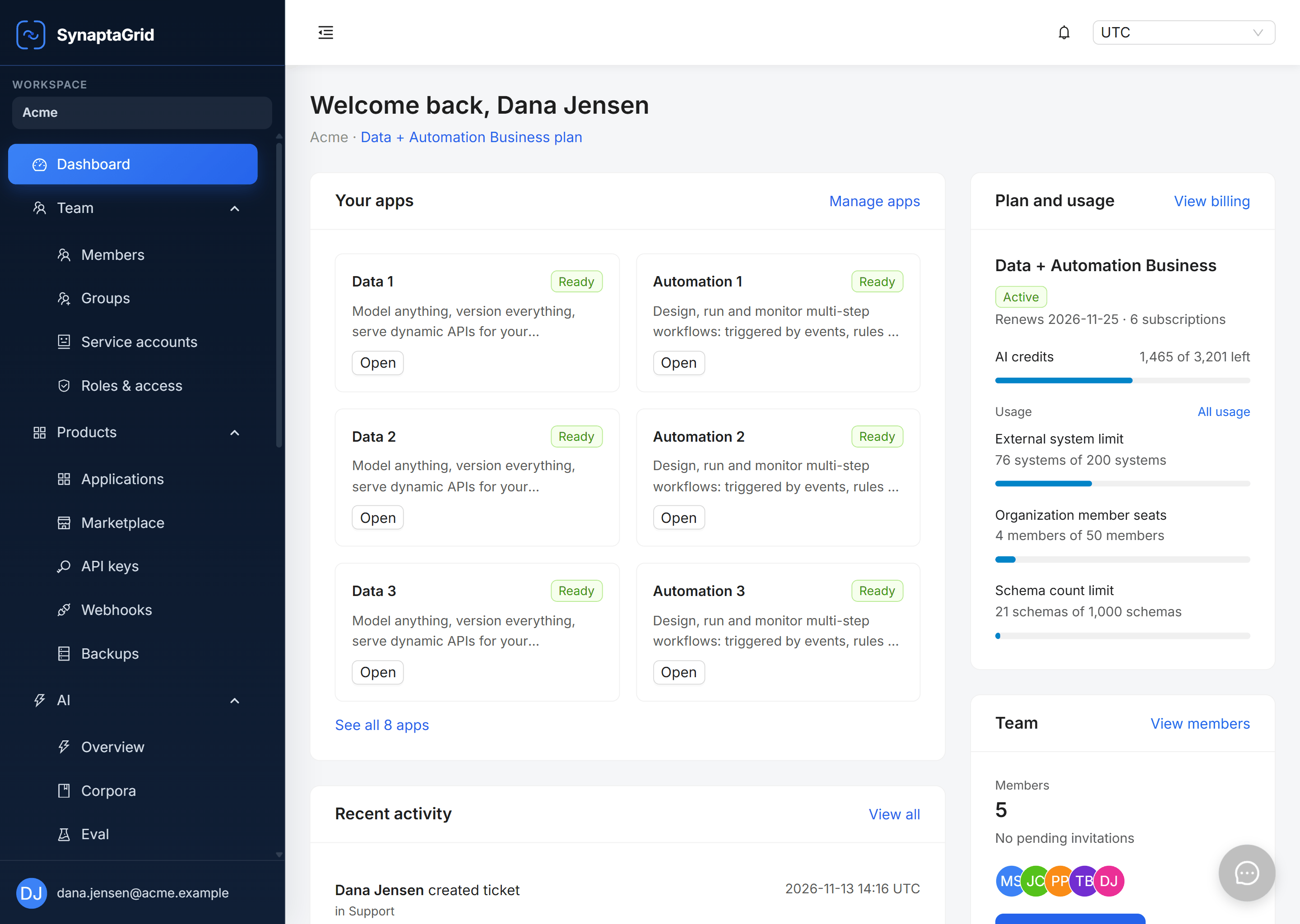
The Control Plane your team uses, and the self-serve portal your customers use.
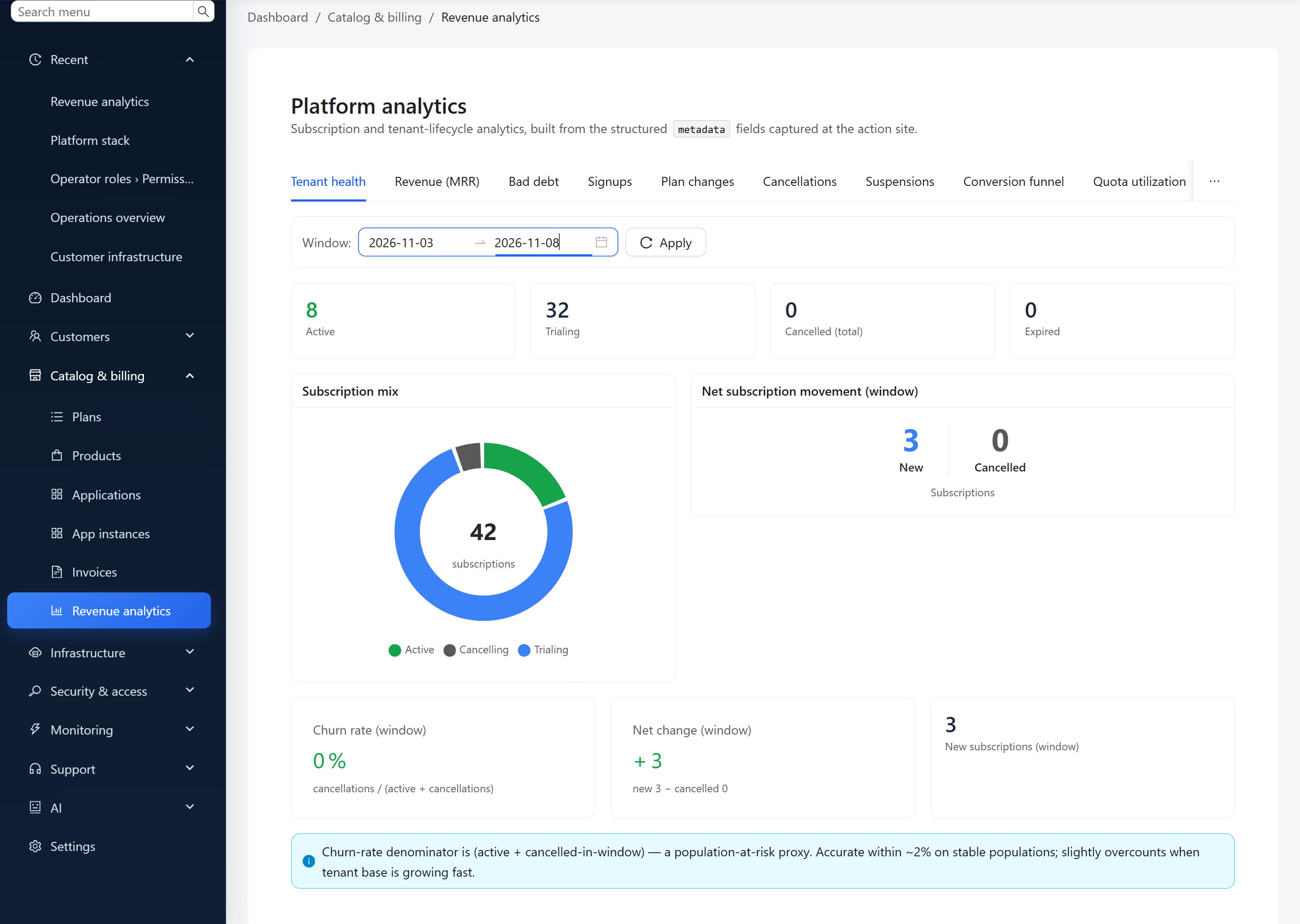
Customer surface
Subscriptions, invoices, applications, team and service accounts, all connected to the same platform.
Your largest customers want their own infrastructure, to handle their scale or because their security and compliance rules require isolation from other customers. With SynaptaGrid Platform you sell it in a plan or as an add-on, app by app, and the platform provisions, moves and removes it as the subscription changes. That is what lets you offer a custom enterprise package: their own plan, their own isolated infrastructure, their own price.
Each app a customer runs can get its own database server, compute, Redis cache and Kafka cluster, at the size you choose. Put them in a plan, or let a customer buy them as a monthly add-on on the subscription they already have.
Nothing is provisioned until the payment is confirmed. Then the platform creates the resource and moves that customer’s workspace onto it, with no ticket and no console step.
When the subscription changes, the platform compares what the customer is entitled to with what they run, and makes the move: from shared to dedicated, to a larger size, or back to shared. Dedicated compute also scales out on its own, up to the maximum you set, as that app’s load grows.
A cancelled add-on keeps its resource until the paid period ends. Then the workspace moves back to shared and the dedicated resource is removed. If a move fails, the add-on is withdrawn and the unused time is credited.
Your developers write the rules and screens that make your product different. The next feature reuses the same permission check, settings editor, tables and notifications instead of building them again.
Roles, plans, settings and events go in one declaration file. Validate and publish it from the command line.
App SDKs for Python and TypeScript give every request its customer context and check the user’s permission, the subscription and the plan feature together.
Data tables with search, filters and export, field editors, and generated settings screens that handle drafts and saves.
Your screens call platform APIs for access, settings and shared services. The docs cover the APIs, keys and rate limits.
Start a new backend service from a template that already boots, migrates and passes CI, with a worked example of each platform pattern to replace with your own domain.
Drop in ready React packages for sign-up, billing and credit purchases, an AI assistant chat panel and import and export, instead of building those screens.
Your public site can list your plans and prices from the platform and register new customers with the sign-up package, so the website and the product sell the same plans.
One endpoint, four checks: the permission, an active subscription, the plan feature and the quota.
@router.post(
    "/v1/my-saas/portal/projects",
    dependencies=[
        Depends(RequireAuthz("project", "create")),  # permission
        Depends(require_active_subscription),        # subscription
        Depends(require_feature("projects")),        # plan feature
        Depends(require_quota("max_projects", current_usage=project_count)),  # quota
    ],
)
async def create_project(payload: ProjectCreate):
return await save_project(payload)When a security review or an IT team goes deeper than the list, open the part it asks about. Each one is a working system with its own settings, permissions and records, from storing a customer’s files to connecting an AI assistant.
Each customer is its own organization, running as many of your apps and installations as they buy.
Organizations
Each customer is its own tenant.
Multiple apps
One customer, many of your apps.
App instances
Several installations of one app per customer.
Scoped data
Scoped on each request, from the sign-in token.
Separate databases
Each customer’s data kept in its own database.
Shared or dedicated
Move one customer to their own resources.
Per-customer settings
Settings, plans and branding per customer.
Regional placement
Choose the US or EU region for each customer.
Declare a setting once. Decide who sees it, who can change it and where it applies.
Every scope
Platform, region, organization, app instance, user.
Operator or customer
Operator-only, or shown in the customer portal.
Inherit & override
Each level overrides the one above.
Tied to plans
A setting can depend on a plan feature.
Typed & validated
Wrong values are rejected before saving.
Generated screens
The settings screen is built from the declaration.
Secrets protected
Masked for operators, never shown to customers.
Per app instance
Each installation configured on its own.
Sign-in for your own team and for your customers, on your own branded screens.
SAML single sign-on
Okta, Microsoft Entra, Google and more.
OpenID Connect
Standards-based sign-in for each app.
LDAP & Active Directory
Sign in against the company directory.
SCIM provisioning
Users and groups created automatically.
Multi-factor sign-in
A second factor on the account.
Social sign-in
Google, Microsoft, GitHub or Facebook.
Service accounts
Scripts and integrations get their own identity and key.
Your sign-in page
Your brand, never a third-party screen.
Email, in-app, Slack and webhooks, with templates, layouts and delivery logs.
Several channels
Email, in-app, Slack and webhooks.
Template editor
Visual editing with variables.
Custom layouts
Headers, footers and branding per workspace.
Your sending domain
Signed, authenticated mail in your name.
User preferences
People choose what they receive.
Priority queues
Security mail is not held behind newsletters.
Retries & suppression
Failures retried, bounces stopped.
Delivery logs
Each message traced to its outcome.
From self-serve checkout to negotiated enterprise contracts, in one system.
Plans & tiers
Including free trials.
Feature entitlements
Each plan turns on exactly the features it sells.
Checkout
Self-serve card payments through Stripe or Paddle.
Subscriptions
Upgrades, downgrades, cancellations.
Invoices
Generated and sent automatically.
Custom invoices
One-off charges and enterprise terms.
Add-ons
Dedicated database or compute, bought from the portal.
Usage & credits
Sell credits and meter consumption.
An AI service, plus MCP access that opens your app to Claude, ChatGPT and other assistants.
AI service
Agents, runs and threads, operated for you.
Your choice of model
Anthropic, OpenAI or your own model endpoint.
Knowledge search
Answers grounded in your documents, with sources.
MCP connector
Customers connect Claude or ChatGPT to their workspace.
Your tools in MCP
Declare a tool and assistants can use it.
Runs as the user
Each tool call checks that person’s permissions.
Approvals
Approval can be required for sensitive actions.
Usage credits
AI usage metered and billed.
Tickets, live chat and a knowledge base, run from one queue across your customers.
Tickets & live chat
From email, the portal or chat.
Agent teams
Routing and assignment to the right team.
Tags
Organise and report on tickets.
Attachments
Uploads on tickets and in chat.
Response targets per plan
Each plan sets its own response times.
Target warnings
Alerts before a target is missed.
Knowledge base
Articles for customers, an editor for your team.
Suggested answers
AI-drafted replies from your knowledge base.
Checks whether each part of your product is up, and keeps your customers informed.
Health checks
Services checked and logged automatically.
Uptime history
A day-by-day availability record.
Components
Status for each part of your product.
Incidents & maintenance
Post updates and schedule maintenance.
Email subscriptions
Customers follow the parts they use.
Slack updates
Updates posted to their channels.
Atom feed
Follow along in any feed reader.
Linked to support
Customers check status before opening a ticket.
A tamper-evident record of what happens, available to your own app through the SDK.
One SDK call
Your app records events like the platform does.
Hash-chained records
Altered or deleted rows are detectable.
Chain verification
Prove the log is intact, on demand.
Entity history
Who changed what, and when.
Search & filters
Filter by actor, action and resource.
Alert rules
Get notified when something matters.
Compliance export
Hand evidence to auditors.
Erasure
Remove a person’s data and keep the chain verifiable.
GDPR controls, and controls designed against SOC 2 and ISO 27001, are built into the platform services your app uses.
Audit-ready
Controls designed against SOC 2 and ISO 27001, with the evidence an auditor asks for.
Data export
A person’s data exported across the platform on request.
Erasure everywhere
Erasure runs across every installed app and is tracked to completion.
Consent records
Terms, privacy, marketing and analytics consent, with version and time.
Privacy choices
Customers grant or withdraw consent in the portal.
Data classification
Each app declares its personal data against a published taxonomy.
Redacted logs
Passwords, tokens and personal data kept out of logs.
Regional placement
Customer data can be placed in the US or EU region; we confirm which data stays in-region for your deployment.
From an empty AWS account to running applications on their own domains.
Automated provisioning
Network, data stores and services, in order.
Dedicated resources
Give a customer their own database or compute.
Build & release pipelines
Each app built, checked and shipped.
Domains & DNS
Domains and certificates set up for you.
Backup & recovery
Daily backups with point-in-time restore.
Scales with load
Shared by default, dedicated on demand.
Multiple regions
Run where your customers are.
Data residency
Customer data placed in the region a customer needs; confirmed per data type for your deployment.
Each service traced, measured and watched, with alerts that reach the right people.
OpenTelemetry
One standard across services.
Distributed tracing
Follow one request through the platform.
Central logs
Searchable and linked to traces.
Metrics & dashboards
Ready-made views for each service.
Alert routing
The right alert to the right person.
Security detections
Login bursts, privilege changes, token failures.
Operator alerts
In the console, by email and in-app.
Cloud alarms
Infrastructure watched at the provider.
Let your customers choose where they work. Their people use your screens, their systems call your API, and an AI assistant can use the same actions: through MCP from the assistant they already use, or in the chat built into your product.
Declare an action once, and it works in your screens, your API and AI assistants over the Model Context Protocol (MCP), with the same permission checks everywhere.
The customer’s system calls your API with a workspace service account: its own key and role, revocable without touching anyone’s login.
Service accounts and API access →A user asks their own AI assistant. Every lookup runs with the signed-in user’s permissions, and the customer admin chooses which tools are on.
AI tools and MCP →A customer subscribes its system to supported events in the catalogue and receives signed webhooks it can verify.
Events and signed webhooks →The platform is audit-ready for SOC 2 and ISO 27001 and aligned with ISO 27017, 27018 and 27701, with the controls, evidence and audit trail an auditor asks for.
SynaptaGrid Platform is a managed multi-tenant platform for B2B SaaS companies. It is the foundation a software team uses to build, launch, sell, operate and keep developing its own SaaS product: development tools and reusable components; organizations, permissions, plans, checkout, subscriptions and invoicing; shared services such as audit, notifications, files, support and AI access over MCP; and the operation of that platform layer on AWS.
B2B software companies with a live product whose next enterprise customer asks for single sign-on, SCIM provisioning, an audit trail, EU data placement or contract billing. Teams building a new SaaS product can build on it from the start, and a business without engineers can have the application built for it.
Your product: the business rules, screens and experience your customers pay for, plus connecting them to the platform through the App SDK and APIs. The platform supplies the accounts, access, billing, shared services and operations around it. If you prefer, we can build the application for you.
Yes. Customers sign in with their own identity provider over OIDC or SAML, and their IT teams can provision and remove people with SCIM. Your operators sign in to the operator console separately.
Customers choose a plan and pay through Stripe or Paddle. The platform creates their workspace, applies the plan’s features and limits, and handles invoices and failed payments. You change what each plan includes without deploying your app.
The platform runs on AWS. Production runs in the United States today, and a customer whose data must stay in Europe can be placed in the EU region. A large customer can be moved to its own database.
Yes, app by app, and you sell it, whether the customer needs it for scale or to meet an isolation requirement. Each app a customer runs can have its own database server, compute, Redis cache and Kafka cluster, included in a plan or bought as a monthly add-on. Once the payment is confirmed the platform provisions the resources and moves that app onto them. Upgrades, downgrades, cancellation and the end of a paid period move the app between shared and dedicated resources and remove what is no longer paid for.
Yes. Every service runs on AWS with auto scaling that adds and removes capacity as CPU and memory load changes, between a floor and a ceiling set for that service, and scheduled scaling for known quiet hours. A busy service can move to larger tasks, and services run on Fargate, EC2 or Spot capacity. A heavy customer can get its own workers and database, and read replicas spread database reads. These settings live in the reviewed deployment configuration, and each change is previewed before it is applied.
The platform is audit-ready for SOC 2 and ISO 27001 and aligned with ISO 27017, 27018 and 27701, with GDPR export and erasure built in and a tamper-evident audit trail. The Trust Center shows the current status of each.
Yes. Your app declares actions as tools, and a customer’s AI assistant can use them over the Model Context Protocol (MCP) with the signed-in user’s permissions. The customer admin decides which tools are enabled.
Each deployment is quoted from your expected customers, environments and support needs. Building or integrating your application is scoped separately. Book a demo or ask for a deployment assessment to get the inputs for a quote.
Bring the enterprise requirement holding up your next release. We’ll review what you already have, what the platform supplies and what your team would connect, then prepare the inputs for a quote.